Meta Description (150 characters)
Learn what USB-A is, how it works, how it compares with USB-C, and why this classic connector is still used in many devices today.
What Is USB-A?
USB-A is one of the most common connector types you will see on computers, laptops, TVs, chargers, and many electronic devices. You might hear people talk about USB ports or USB plugs, and USB-A is usually what they mean when referring to the standard rectangular port found on most older-generation devices. USB stands for Universal Serial Bus, a universal technology that lets computers and other devices communicate, send data, and charge devices in a standard way. This design made USB one of the most successful and widely used connection types in the world.
The Meaning of USB
USB itself is a technology standard created so different machines and accessories can easily connect to a computer and exchange data or power. Before USB, computers often had many different kinds of special ports for keyboards, mice, printers, and more. USB simplified all of that by giving one standard interface to handle lots of tasks with one simple shape and cable system.
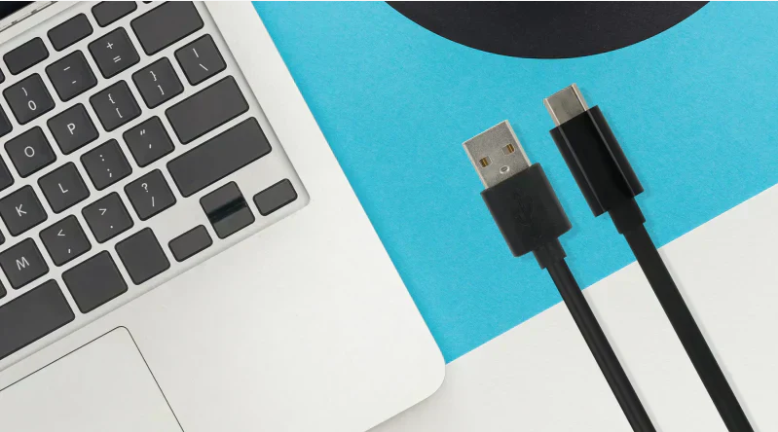
Within USB technology, there are various types of physical connectors. USB-A is the original and most common connector type designed to plug into the host device (like a computer or laptop). It is rectangular and flat, with the plug facing only one way, so it must be inserted correctly to work.
What USB-A Looks Like

USB-A ports are flat and rectangular, and you will see them on the edges of computers, desktops, game consoles, some TVs, and many chargers. Because the plug only fits in one orientation, you must align it properly when inserting. Older USB-A ports came in two main speed standards: USB 2.0 (standard speed) and USB 3.x (faster speed), with different internal colors (sometimes black, blue, or red) to show their speed type.
Even though newer connector types like USB-C are becoming more common, many devices still feature USB-A because it is reliable, proven, and works with older accessories and cables that people already own.
What Does USB-A Do?
A USB-A port serves several main purposes:
1. Data Transfer
USB-A can transfer data between devices, such as copying files from a flash drive to a computer, syncing photos, or connecting a keyboard and mouse. The speed depends on the USB standard supported by the specific port and cable.
2. Power and Charging
USB-A also supplies power to connected devices. This means a USB-A port can charge phones, tablets, wireless speakers, and other accessories when paired with the right cable. Older USB-A power levels are lower than newer standards, but they still provide basic charging for many devices.
3. Peripheral Connectivity
USB-A allows you to connect many peripheral devices like keyboards, mice, printers, scanners, game controllers, external hard drives, and flash storage drives. Because this connector has been around for so long, most gadgets support USB-A in some way.
USB-A in Everyday Life

Most people first encounter USB-A at school, home, or work when they plug in a flash drive or a computer accessory. Even though newer devices are moving toward smaller and reversible connectors like USB-C, USB-A remains widely used because of its universal compatibility. Many USB hubs still include several USB-A ports so users can connect multiple devices at once without worrying about having the right adapter.
USB-A ports are also common on basic power chargers and multi-port charging blocks. A USB-A charger can power nearly any gadget that uses USB cables, as long as the charging voltage and current match the device’s needs.
Read also:-When Was Bluetooth Invented? A Simple Story Everyone Can Understand
How USB-A Compares to Other Types
USB-A is not the only USB connector type. Others include USB-B (used on some printers and larger devices) and USB-C (used on many modern phones, laptops, and tablets). USB-C is a newer, small connector that can be plugged in either way and often supports faster data transfer and higher power compared to USB-A. USB-A does not support the same high power delivery and special video or alternate modes that USB-C can handle, but it remains useful for many older gadgets and accessories.
Even though USB-C is replacing USB-A in many new computers and phones, USB-A continues to live on in things like flash drives, older computers, keyboards, and many peripherals that still rely on this classic connector type.
Why USB-A Is Still Useful

One major reason USB-A is still in use is compatibility. Because USB-A has been around for decades, most accessories and cables are built to work with it. If you plug an older USB-A flash drive or mouse into a newer computer, chances are it will work with no extra setup. This makes USB-A a very practical standard that still serves millions of users around the world.
Another reason is cost and simplicity. USB-A cables are inexpensive to produce, easy to use, and reliable for basic data transfer and device charging. For everyday tasks like transferring photos from a camera or connecting a USB keyboard, USB-A is still a dependable choice.
Frequently Asked Questions (FAQs)
Q: What does USB-A mean?
A: USB-A refers to the original rectangular USB connector used to connect many devices to computers and chargers. It is part of the Universal Serial Bus standard.
Q: Why is USB-A so common?
A: USB-A has been used for many years, so most older accessories and devices were designed to use it. This makes it widely compatible with PCs and many gadgets.
Q: Can USB-A charge my phone?
A: Yes, USB-A can supply power to charge phones and other devices, but the charging speed depends on the port and cable specifications.
Q: Is USB-A better than USB-C?
A: USB-C offers newer features like reversible connector design, faster speeds, and higher power support, but USB-A is still useful for older devices and simple peripherals.
Q: Do all USB-A ports transfer data?
A: Yes, USB-A can transfer data, but the actual speed depends on the USB standard (USB 2.0, 3.0, etc.) the port uses.
Q: Will USB-A disappear completely?
A: Over time, USB-C is replacing USB-A in many new devices, but USB-A will remain common for older peripherals and accessories for many years.
Q: Can I use USB-A with modern laptops?
A: Many modern laptops still include at least one USB-A port, but if a laptop only has USB-C, users can use adapters or hubs to connect USB-A devices.
Conclusion
USB-A is one of the best-known USB connector types. It allows you to connect all kinds of devices for data transfer, charging, and communication between devices. While newer USB types like USB-C offer improved speed and power features, USB-A is still widely used today and remains a trusted way to connect many common devices. Because it is simple, reliable, and compatible with tens of millions of gadgets, USB-A continues to be an essential part of modern computing.