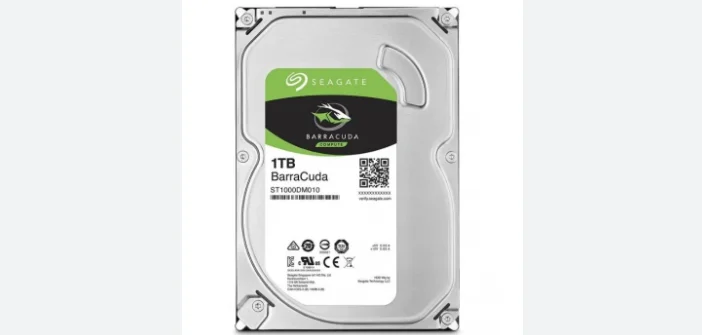
If you’ve ever run out of space on your laptop or PC, you already know how important a good hard disk is. From work documents to family photos and your favorite movies, everything takes up space. That’s where a 1TB hard disk comes in — it’s spacious, dependable, and doesn’t cost a fortune.
Whether you’re a student managing assignments, a gamer with massive game files, or someone who just wants to keep memories safe, a 1TB hard drive is one of the smartest investments you can make.
What Does 1TB Actually Mean?
Let’s break it down.
“1TB” stands for one terabyte, which equals 1,000 gigabytes of data. In simple terms, that’s enough room to store around:
- 250,000 photos
- 500 hours of HD videos
- 6.5 million documents
- Over 200 full-size games
That’s a lot of room for everything you love!
Why a 1TB Hard Disk Is Still a Great Choice

1. Massive Storage at a Low Cost
You get tons of space without breaking the bank. Compared to SSDs, a 1TB HDD is still much more affordable and perfect for bulk storage.
2. Reliable and Long-Lasting
Modern hard disks are built to last. They’re designed to handle everyday use, whether you’re saving office files or backing up entire systems.
3. Perfect for Backups
Having a 1TB external hard disk means your important data — photos, videos, or work — stays safe even if your main computer crashes.
4. Works with Almost Everything
From desktops and laptops to gaming consoles and smart TVs, 1TB drives connect easily through USB or SATA ports. No complicated setup needed!
Internal vs External Hard Disk — Which One to Pick?
When shopping for a 1TB hard disk, you’ll come across two main types:
- Internal Hard Disk: Installed inside your computer. Great for boosting performance or adding permanent storage.
- External Hard Disk: A portable option that connects via USB. Ideal for backups, traveling, and sharing large files easily.
If you move data around often, go for an external drive. If you’re upgrading your PC or laptop, an internal HDD is a better pick.
Performance and Speed
A 1TB hard disk may not be as fast as an SSD, but it’s still efficient for regular use. Most HDDs spin at 5400 or 7200 RPM. The faster the spin, the quicker your data loads.
For example, a 7200 RPM HDD is great for gaming or running large applications, while a 5400 RPM model is perfect for everyday storage.
Tips to Keep Your Hard Disk Healthy

To make sure your hard disk lasts for years, follow these easy habits:
- Handle it carefully — avoid drops or shocks.
- Always eject it safely before unplugging.
- Keep it away from moisture and heat.
- Run disk checks once in a while.
- Use it regularly to keep it in good condition.
A little care goes a long way in protecting your data.
How People Use a 1TB Hard Disk
A 1TB drive can do more than just hold files. People use it for:
- Gaming: Storing big titles and updates.
- Movies and music: Keeping entire collections offline.
- Office work: Managing projects, presentations, and reports.
- Education: Saving study materials and class recordings.
- Backup: Keeping a full system or photo library safe.
It’s flexible enough to fit any lifestyle.
HDD vs SSD – Which One Should You Buy?
| Feature | 1TB HDD | 1TB SSD |
|---|---|---|
| Speed | Moderate | Super fast |
| Price | Affordable | Expensive |
| Durability | Good | Excellent |
| Noise | Slight | Silent |
| Best For | Storage & backup | Performance & speed |
If you need fast boot-up and app performance, get an SSD. But if you just want more space for your files at a lower cost, a 1TB HDD is unbeatable.
Read also:-Best RAM for Gaming PC: A Step-by-Step Buyer’s Guide
FAQs About 1TB Hard Disk
Q1: How much data can a 1TB hard disk store?
You can store up to 250,000 photos or 500 hours of HD video — enough for most users.
Q2: Can I use a 1TB hard disk for gaming?
Absolutely! It’s perfect for storing games and updates, especially for consoles like PlayStation or Xbox.
Q3: How long does a hard disk last?
With good care, most last between 3 to 5 years or longer.
Q4: What’s the difference between an external and internal hard disk?
An internal drive stays inside your computer, while an external one connects via USB and is portable.
Q5: Is it easy to install a 1TB internal hard disk?
Yes, most can be installed in minutes with a few simple steps.
Final Thoughts
A 1TB hard disk is still one of the best storage solutions you can buy. It’s reliable, affordable, and versatile enough to fit nearly any need — from backups to gaming and beyond.
If you want something that keeps your files safe, offers plenty of space, and doesn’t empty your wallet, a 1TB HDD is a perfect choice. Simple, smart, and built to last — exactly what good tech should be.