Running out of storage is a common problem for many smartphone users. When your phone storage is full, it becomes slow and you cannot install new apps or take photos. That is why many users search for how to free up storage on Android in a simple and effective way.
The good news is that you do not need any special skills to clean your phone storage. Android devices provide easy options to remove unnecessary files and free up space.
In this guide, you will learn how to free up storage on Android with simple steps that anyone can follow.
Why Storage Gets Full on Android
Before learning how to free up storage on Android, it is important to understand why storage gets full.
Photos and videos take a lot of space, especially high quality ones.
Apps and games also use storage, and some apps store extra data.
Cache files and temporary files build up over time.
Downloads folder may contain unwanted files.
These small things together fill your phone storage quickly.
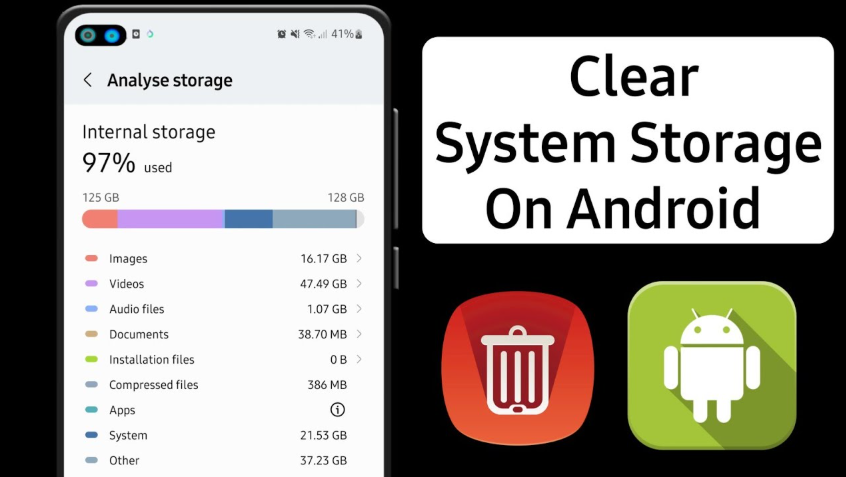
Check Storage Usage

The first step in how to free up storage on Android is checking what is using space.
Open Settings on your phone.
Tap on Storage.
You will see a breakdown of storage usage like apps, photos, videos, and system files.
This helps you understand where you need to clean space.
Delete Unnecessary Apps

Many users have apps they do not use.
Go to Settings and open Apps.
Select apps that you no longer need.
Tap Uninstall to remove them.
Deleting unused apps is one of the fastest ways to free up storage.
Clear Cache Data

Cache files are temporary data stored by apps.
They help apps load faster but can take up space over time.
Go to Settings and open Apps.
Select an app.
Tap on Storage and then Clear Cache.
Do not tap Clear Data unless needed.
Clearing cache helps free up space without deleting important data.
Read more:-1TB Hard Disk: 7 Powerful Reasons Why It’s a Smart and Reliable Storage Choice
Remove Unwanted Photos and Videos
Photos and videos use the most storage on Android devices.
Open your gallery.
Delete blurry, duplicate, or unwanted photos.
Remove old videos that you no longer need.
You can also move files to cloud storage or a computer.
This step can free a large amount of space quickly.
Use File Manager to Delete Junk Files
Most Android phones have a file manager.
Open File Manager or My Files.
Check folders like Downloads, WhatsApp, and Documents.
Delete unnecessary files.
Cleaning junk files is an important part of how to free up storage on Android.
Use Built in Storage Cleaner
Many Android phones provide a storage cleaner feature.
Go to Settings and open Storage.
Tap on Clean or Free Up Space.
The system will suggest files to delete.
This is a quick and safe way to clean storage.
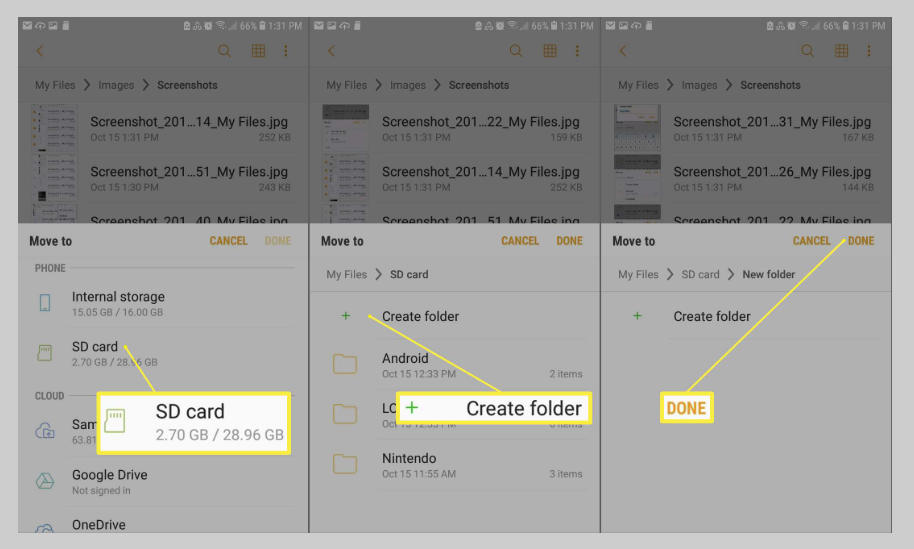
Move Files to SD Card
If your phone supports an SD card, you can move files to it.
Go to File Manager.
Select photos, videos, or files.
Move them to SD card.
This helps free internal storage without deleting data.
Backup and Delete Old Data
You can back up important data to cloud storage or a computer.
After backup, delete the files from your phone.
This is useful for large files like videos and documents.
It keeps your data safe while freeing space.
Tips to Keep Storage Free
Regularly check your storage usage.
Avoid installing unnecessary apps.
Delete unwanted files weekly.
Use cloud storage for large files.
Keep your phone updated.
These habits help maintain free storage.
Common Problems and Solutions
Sometimes storage still feels full after cleaning.
Restart your phone to refresh storage.
Check hidden files in file manager.
Clear cache for multiple apps.
Update your system software.
These simple solutions can help solve storage issues.
Conclusion
Learning how to free up storage on Android is very important for keeping your phone fast and smooth. When your storage is clean, your device performs better and you can install new apps easily.
By following simple steps like deleting unused apps, clearing cache, and removing unwanted files, you can quickly free up space. Regular maintenance will help you avoid storage problems in the future.
With the tips shared in this guide, you can manage your Android storage easily and keep your phone running like new.
FAQ
How to free up storage on Android quickly
Delete unused apps, clear cache, and remove unwanted photos.
Is it safe to clear cache data
Yes, clearing cache is safe and does not delete personal data.
What takes the most storage on Android
Photos, videos, and apps usually take the most space.
Can I use SD card to free storage
Yes, moving files to SD card helps free internal storage.
How often should I clean my phone storage
It is good to clean storage once every week.