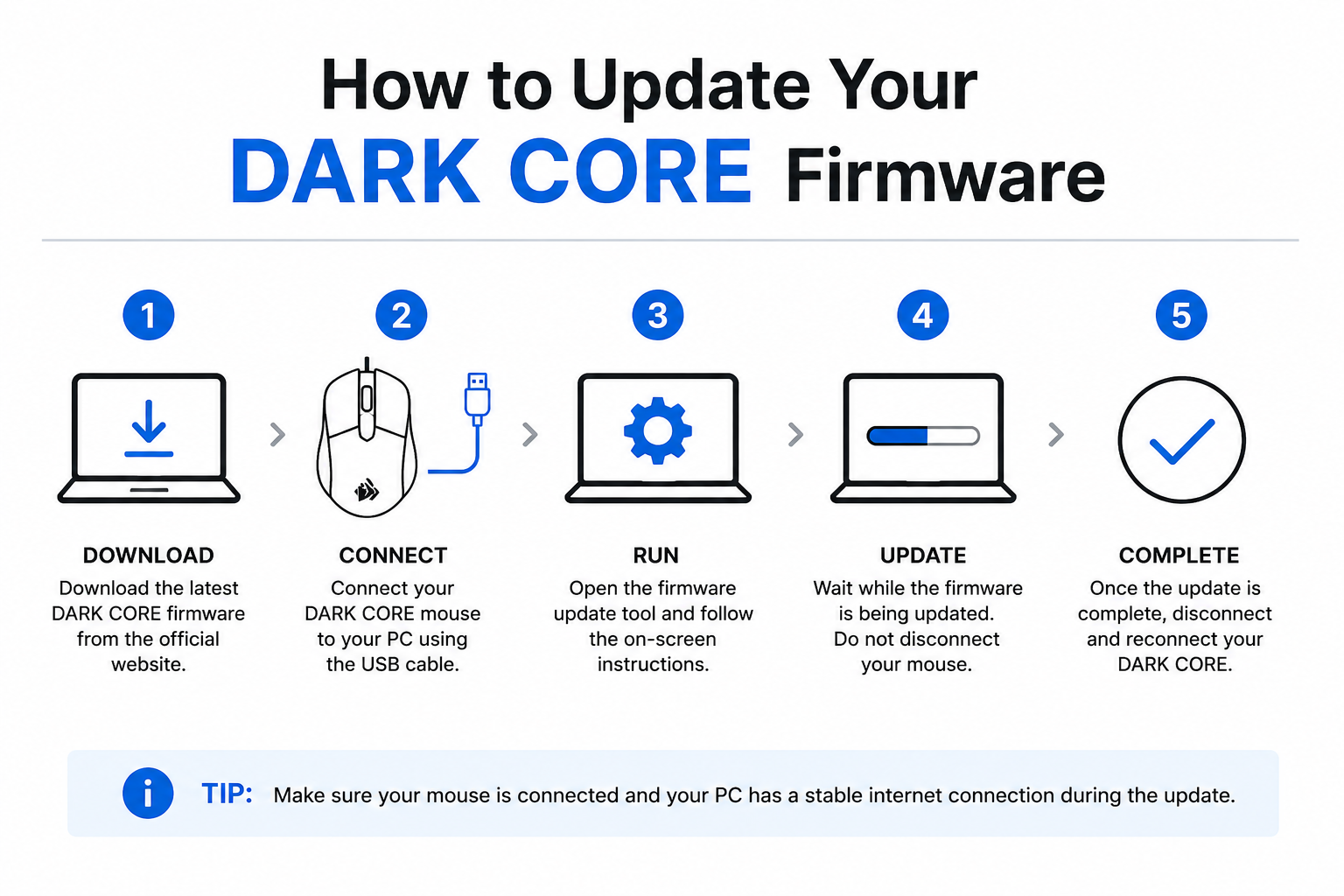
How to Update Your DARK CORE Firmware helps users improve mouse performance, fix connectivity issues, and ensure stable operation using the latest firmware through Corsair iCUE software. Corsair recommends connecting both the USB dongle and mouse during the update process.
Keeping your gaming mouse updated is important for maintaining smooth performance, fixing bugs, improving wireless stability, and unlocking new features. If you own a DARK CORE gaming mouse, learning How to Update Your DARK CORE Firmware can help improve responsiveness, battery optimization, RGB performance, and overall system compatibility.
Many users ignore firmware updates until they start facing issues like lag, connection problems, button malfunctions, or software detection errors. Fortunately, updating the firmware is usually quick and easy when done properly.
This complete guide explains How to Update Your DARK CORE Firmware safely and correctly using simple step-by-step instructions.
What Is DARK CORE Firmware?
Firmware is the internal software that controls how your DARK CORE gaming mouse operates. It manages:
- Wireless connectivity
- RGB lighting
- Button response
- DPI settings
- Battery communication
- Performance optimization
Manufacturers release firmware updates regularly to fix bugs and improve compatibility with Windows updates and gaming software.
Updating firmware helps your device work more efficiently and reduces technical problems.
Why You Should Update Your DARK CORE Firmware

There are several reasons why firmware updates are important.
Better Performance
Firmware updates often improve mouse responsiveness and tracking accuracy.
Bug Fixes
Updates can solve:
- Random disconnects
- RGB lighting glitches
- Scroll wheel problems
- Input lag
- Freezing issues
Improved Compatibility
Firmware updates help your DARK CORE mouse work properly with:
- Latest Windows versions
- Gaming software
- USB drivers
- Wireless adapters
Enhanced Stability
Updated firmware improves wireless connection reliability and battery management.
Things to Check Before Updating Firmware

Before starting the update process, prepare your system carefully.
Charge Your Mouse
Ensure the battery is sufficiently charged.
A firmware update interruption caused by low battery may create problems.
Use a Stable USB Connection
Connect your DARK CORE mouse directly to the PC using the original USB cable.
Avoid using:
- USB hubs
- Extension adapters
- Faulty USB ports
Close Background Applications
Close unnecessary software before updating firmware.
This helps avoid interruptions during installation.
Install Latest iCUE Software
Firmware updates are usually managed through iCUE software.
Using the latest version improves update success.
How to Update Your DARK CORE Firmware
Follow these simple steps carefully.
Step 1: Connect Your DARK CORE Mouse
Use the provided USB cable to connect the mouse directly to your computer.
A wired connection is recommended during firmware installation because it provides better stability.
Step 2: Open iCUE Software
Launch the iCUE software on your PC.
Once opened, the software should automatically detect your DARK CORE mouse.
If the device does not appear:
- Reconnect the mouse
- Restart iCUE
- Try another USB port
Step 3: Select Your Device
Inside iCUE, click on your DARK CORE mouse icon.
This opens device settings and customization options.
Step 4: Check for Firmware Updates
Navigate to the device settings section.
Locate the firmware update option.
The software will automatically check whether a newer firmware version is available.
Step 5: Start the Firmware Update
Click the update button to begin installation.
During the process:
- Do not unplug the mouse
- Do not close iCUE
- Avoid restarting the PC
The firmware installation may take several minutes.
Step 6: Wait for Completion
Once the update finishes, the mouse may restart automatically.
You may notice:
- RGB lights blinking
- Temporary disconnection
- Device reboot
This is completely normal.
Step 7: Verify Firmware Version
After completion, check the firmware version inside iCUE to confirm the update installed successfully.
Your DARK CORE mouse is now fully updated.
Common Problems During Firmware Updates

Sometimes users face issues while updating firmware.
Here are common problems and solutions.
DARK CORE Not Detected
Possible causes:
- Faulty USB connection
- Outdated iCUE software
- Driver issues
Fix
- Reconnect the cable
- Restart the PC
- Reinstall iCUE
- Try another USB port
Firmware Update Stuck
Sometimes the progress bar freezes.
Fix
- Wait a few minutes
- Restart iCUE
- Reconnect the mouse
- Retry the update
Avoid disconnecting the device immediately.
Wireless Mode Problems After Update
Some users experience wireless issues after firmware installation.
Fix
- Re-pair the wireless dongle
- Restart the mouse
- Reboot the system
iCUE Crashing During Update
Software conflicts may interrupt the update process.
Fix
- Close background apps
- Disable antivirus temporarily
- Run iCUE as administrator
Benefits of Updating DARK CORE Firmware Regularly
Regular updates help maintain the best gaming experience.
Improved Gaming Accuracy
Updated firmware can improve:
- Sensor precision
- Polling rate performance
- Click response time
Better Battery Efficiency
Firmware optimization often improves battery life.
Enhanced RGB Synchronization
Updates may improve lighting effects and synchronization with other devices.
Stability Improvements
Firmware updates reduce random crashes and wireless instability.
Read more:-How to Find Your Mouse Pointer in Windows 10: Smart Guide for Easy Cursor Tracking
Tips for Safe Firmware Updates
To safely update your DARK CORE firmware, follow these recommendations.
Use Original Accessories
Always use the original USB cable and receiver.
Keep Your PC Plugged In
Avoid sudden shutdowns during firmware installation.
Do Not Interrupt the Process
Interrupting updates may corrupt firmware.
Update Software First
Install the latest iCUE version before updating firmware.
When Should You Update Firmware?
You should update firmware when:
- New updates are available
- The mouse behaves abnormally
- Wireless issues appear
- RGB effects malfunction
- Performance drops during gaming
However, if your mouse works perfectly, avoid unnecessary interruptions during important gaming sessions.
Can Firmware Updates Improve Gaming Performance?
Yes, firmware updates can improve overall gaming experience by optimizing:
- DPI response
- Wireless latency
- Sensor tracking
- Polling consistency
Competitive gamers especially benefit from optimized firmware.
Is Firmware Update Safe?
Yes, firmware updates are generally safe when performed correctly.
Problems usually happen because of:
- Power interruption
- Faulty USB connections
- Software crashes
Following proper steps minimizes risks significantly.
Conclusion
Understanding How to Update Your DARK CORE Firmware is essential for keeping your gaming mouse running smoothly and efficiently. Firmware updates improve performance, fix bugs, increase stability, and ensure better compatibility with modern systems and games.
Using iCUE software makes the update process simple even for beginners. By following the correct steps and avoiding interruptions, you can safely keep your DARK CORE mouse updated for the best gaming experience possible.
FAQ
Why should I update my DARK CORE firmware?
Firmware updates improve performance, fix bugs, and enhance device compatibility.
Can firmware updates fix wireless issues?
Yes, many updates improve wireless connection stability and reduce lag.
Is iCUE required for firmware updates?
Yes, iCUE software is commonly used to update DARK CORE firmware.
What happens if the update gets interrupted?
An interrupted update may cause temporary device problems or firmware corruption.
How long does a firmware update take?
Most DARK CORE firmware updates finish within a few minutes.
Can outdated firmware cause gaming issues?
Yes, outdated firmware may cause lag, connection issues, or button response problems.
Should I use wireless mode during updates?
No, a wired USB connection is recommended for stable firmware installation.