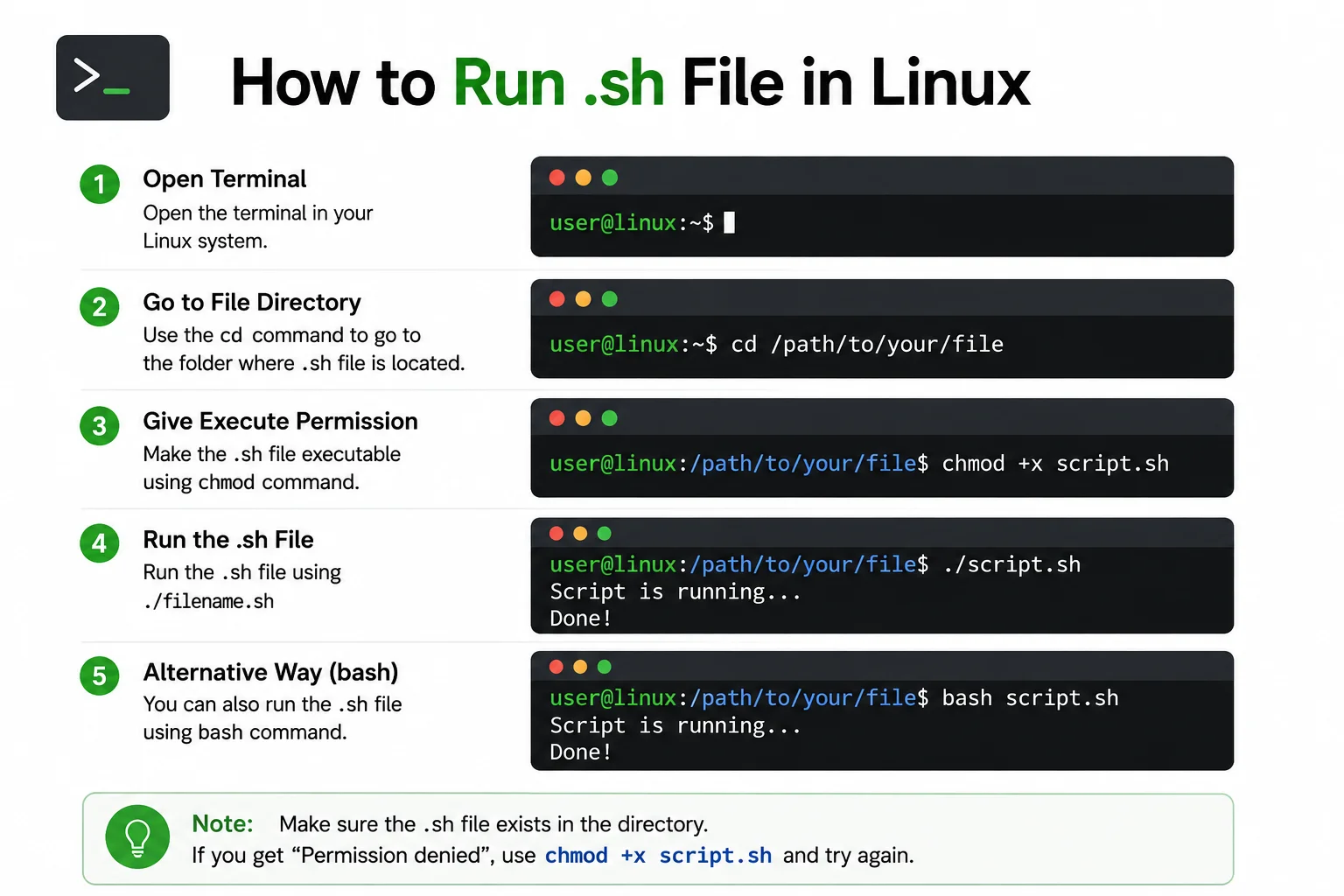
How to Run .sh File in Linux
If you are learning Linux, you will often come across files ending with .sh. These are shell script files that contain a series of commands that Linux can execute. Knowing how to run .sh file in Linux is useful for installing software, automating tasks, running programs, and managing system operations.
Running a shell script is usually simple, but Linux may require the file to have execute permission first. In this guide, we will explain different ways to run a .sh file, how to give it permission, and what to do if you receive an error.
What Is a .sh File?
A .sh file is commonly used as a shell script. It contains Linux commands written together in a file so they can be executed as a group.
For example, a simple script may contain:
#!/bin/bash
echo "Hello, World!"
The first line tells Linux which shell can be used to interpret the script. The second line displays a message in the terminal.
Shell scripts are commonly used for software installation, backups, system administration, file management, and repetitive tasks.
Before You Run a .sh File

Before running a shell script, make sure you know where the file is located.
Open the Terminal and use the cd command to move to the folder containing the script.
For example:
cd DownloadsYou can check the files in the current folder by using:
lsLook for the file ending with .sh.
For example:
install.sh
backup.sh
setup.sh
How to Run .sh File in Linux
There are several ways to run a shell script in Linux.
The most common method is to first give the script execute permission and then run it from the terminal.
Use:
chmod +x filename.shReplace filename.sh with the actual name of your file.
For example:
chmod +x install.shAfter giving the file permission, run it with:
./install.shThe ./ tells Linux to run the file from the current directory.
How to Run a .sh File Using Bash
You do not always need to change the file’s executable permission.
You can directly use Bash to run the script:
bash filename.shFor example:
bash install.shThis method tells Bash to open the script and execute the commands inside it.
It can be useful when the file does not have executable permission.
How to Run a .sh File Using Sh
Another option is the sh command.
Use:
sh filename.shFor example:
sh setup.shThis can work with scripts written for a compatible shell.
However, some scripts are specifically designed for Bash and may use Bash-specific features. In those cases, using bash filename.sh is usually more appropriate.
How to Make a Shell Script Executable
If Linux displays a permission error when you try to run your script, you may need to add execute permission.
Use:
chmod +x filename.shThen run:
./filename.shYou can check the permissions with:
ls -l filename.shIf execute permission has been added, you should see an x in the permission information.
Read More:-How to Use apt Install in WSL: Ultimate Beginner’s Tutorial
Run a .sh File With Administrator Permission
Some shell scripts need administrator privileges to modify system files or install software.
If the script requires administrator access, you may need to run:
sudo ./filename.shLinux will ask for your user password if administrator permission is required.
Only use sudo when you trust the script and understand what it is going to do. A script running with administrator privileges can make significant changes to your system.
Check the Script Before Running It
It is important to understand what a shell script does before executing it, especially if you downloaded it from an unknown source.
You can open the script with a text editor or display its contents in the terminal.
For example:
cat filename.shYou can also inspect the commands line by line.
Look for commands that install software, delete files, modify system settings, or download additional files.
Do not run an unfamiliar script with sudo simply because it asks for administrator access.
Common Error: Permission Denied

One of the most common problems is:
Permission deniedThis usually means the script does not have execute permission.
Try:
chmod +x filename.shThen run:
./filename.shIf the problem continues, check the file permissions and make sure you are in the correct directory.
Common Error: No Such File or Directory
If you see:
No such file or directoryLinux may not be able to find the script.
Use:
pwdto see your current directory.
Then use:
lsto check whether the .sh file is actually there.
If the file is in another folder, use cd to move to that location.
Check the Shell Used by the Script
Some scripts start with a special line called a shebang.
For example:
#!/bin/bashThis indicates that Bash should be used to execute the script.
Another script might use:
#!/bin/shThe shell used by the script can affect whether certain commands work correctly.
If a script specifically requires Bash, running it with Bash can avoid compatibility problems.
Run a .sh File From Any Location
You can also run a script by providing its full or relative path.
For example:
bash /home/user/Downloads/install.shIf the script is executable, you can also use:
/home/user/Downloads/install.shThis is useful when you do not want to change the current directory.
Make Your Own .sh File
You can create a simple shell script to practice.
Open a text editor and write:
#!/bin/bash
echo "Hello from Linux"
Save the file as:
hello.shOpen the Terminal and move to the folder where you saved it.
Then run:
chmod +x hello.shFinally:
./hello.shYou should see:
Hello from LinuxThis is a simple way to understand how shell scripts work.
Conclusion
Learning how to run .sh file in Linux is an important basic skill for Linux users. You can run a script with bash filename.sh, use sh filename.sh, or make it executable with chmod +x and then run it using ./filename.sh.
If you receive a permission error, check the file permissions. If Linux cannot find the file, verify your current directory and the script’s location. Most importantly, always inspect unfamiliar scripts before running them, particularly when administrator access is requested.
FAQ
What is a .sh file in Linux?
A .sh file is a shell script containing commands that can be executed by a Linux shell.
How do I run a .sh file in Linux?
Open Terminal, move to the file’s folder, give it execute permission with chmod +x filename.sh, and run it using ./filename.sh.
Can I run a .sh file without chmod?
Yes. You can use bash filename.sh or sh filename.sh without making the file executable.
Why does my .sh file say Permission denied?
The file may not have execute permission. Try chmod +x filename.sh and then run it again.
Can I run a .sh file with sudo?
Yes, if the script legitimately requires administrator privileges. Use sudo ./filename.sh only when you trust the script.
How do I check what is inside a .sh file?
You can use cat filename.sh to display the script in the Terminal or open it with a text editor.