Learning how to remove SIM card from Samsung A04 is important for every smartphone user. Whether you want to switch networks, replace your SIM card, upgrade to a new carrier, or troubleshoot network problems, removing the SIM card correctly helps protect your phone and SIM tray from damage.
The Samsung Galaxy A04 comes with a dedicated SIM tray that is simple to use, but many users still struggle to remove it safely. Using the wrong method or too much force can damage the SIM tray, internal pins, or even the phone itself.
This complete guide explains everything you need to know about how to remove SIM card from Samsung A04 safely and properly.
What Is a SIM Card?
A SIM card stands for Subscriber Identity Module. It stores important information related to your mobile network.
The SIM card helps your phone:
- Connect to mobile networks
- Make calls
- Send messages
- Use mobile data
- Store carrier information
Without a SIM card, your Samsung A04 cannot access most cellular network services.
Where Is the SIM Card Slot on Samsung A04?
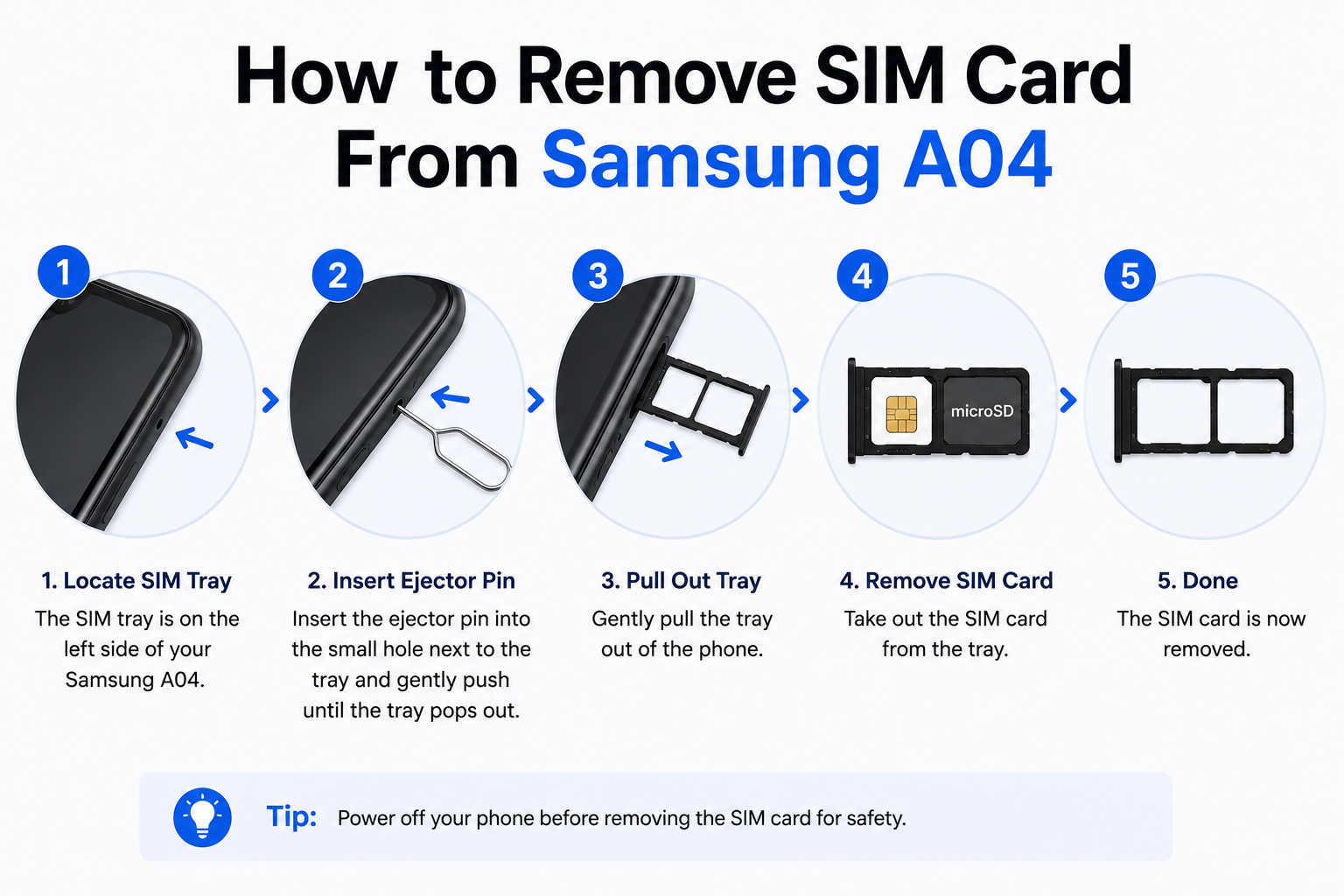
The Samsung Galaxy A04 has a SIM tray located on the side of the device.
In most Samsung A04 models, the SIM tray is positioned on the left side of the phone.
The tray usually supports:
- Dual Nano SIM cards
- One microSD memory card
The tray is very small and can only be opened using a SIM eject tool.
Things You Need Before Removing the SIM Card

Before starting the process, prepare a few things.
SIM Eject Tool
Samsung includes a small SIM eject pin inside the phone box.
This tool helps open the SIM tray safely.
Alternative Tools
If you do not have the eject tool, you can use:
- Small paper clip
- Thin pin
- SIM eject needle
Avoid using thick or sharp objects.
Clean Workspace
Work on a flat and clean surface to avoid losing the SIM card.
Why You May Need to Remove the SIM Card
There are several reasons why users remove the SIM card from Samsung A04.
Changing Mobile Networks
You may switch to a new SIM provider for better plans or network coverage.
Replacing a Damaged SIM
Old or damaged SIM cards may stop working properly.
Fixing Network Problems
Removing and reinserting the SIM card can sometimes solve:
- No signal
- SIM not detected
- Mobile data issues
- Calling problems
Selling or Resetting the Phone
Before selling your device, removing the SIM card protects your personal information.
How to Remove SIM Card From Samsung A04
Follow these steps carefully.
Step 1: Turn Off Your Samsung A04
Although some phones allow SIM removal while powered on, it is safer to switch off the device first.
To turn off the phone:
- Press and hold the power button
- Tap Power Off
- Wait until the phone fully shuts down
This helps prevent network or hardware issues.
Step 2: Locate the SIM Tray
Look at the side of your Samsung A04.
You will see a small hole next to the SIM tray.
This tiny hole is used to eject the tray.
Step 3: Insert the SIM Eject Tool
Take the SIM eject tool and carefully insert it into the small hole.
Push gently but firmly.
Do not force the tool at an angle.
Step 4: Remove the SIM Tray
After pressing the eject hole, the SIM tray will slightly pop out.
Carefully pull the tray out using your fingers.
Handle the tray gently to avoid bending it.
Step 5: Remove the SIM Card
Take the SIM card out of the tray carefully.
Avoid touching the gold metal contacts too much.
Keep the SIM card in a safe place.
How to Insert the SIM Card Again
If you want to reinstall the SIM card, follow these steps.

Place the SIM Correctly
Position the Nano SIM card in the tray according to the shape guide.
The angled corner helps align the SIM properly.
Insert the Tray Slowly
Slide the tray back into the phone gently.
Do not force it.
Push until the tray fits completely inside.
Turn On the Phone
Power on the Samsung A04.
The device should automatically detect the SIM card.
Read more:-How to Format a microSD Card to FAT32 – 5 Powerful & Easy Methods That Work
Common Problems While Removing SIM Card
Sometimes users face issues while removing the SIM tray.
SIM Tray Not Opening
This usually happens because:
- Incorrect tool size
- Not enough pressure
- Dirt blocking the tray
Use gentle pressure only.
SIM Card Stuck
If the SIM card is stuck:
- Remove the tray slowly
- Avoid sharp tools
- Do not bend the tray
Phone Not Detecting SIM
After reinserting the SIM card, restart the device.
Also check:
- SIM placement
- SIM damage
- Network settings
Tips for Safe SIM Card Removal
These tips help protect your Samsung A04.
Never Force the Tray
Too much pressure can permanently damage the SIM mechanism.
Avoid Wet Hands
Moisture can damage the SIM card and tray contacts.
Keep Dust Away
Dust inside the SIM slot may affect network connectivity.
Use Original SIM Size
Samsung A04 uses Nano SIM cards only.
Do not insert Micro or Standard SIM cards without proper trimming.
Can Removing the SIM Card Delete Data?
No, removing the SIM card does not erase:
- Photos
- Videos
- Apps
- Internal storage files
However, some contacts saved directly on the SIM may not appear until the SIM is reinserted.
Does Samsung A04 Support Dual SIM?
Yes, many Samsung Galaxy A04 models support dual SIM functionality.
This allows users to:
- Use two phone numbers
- Manage personal and work calls
- Use separate mobile networks
When Should You Replace Your SIM Card?
You may need a new SIM card if you experience:
- Frequent signal loss
- SIM read errors
- Poor network performance
- Physical SIM damage
Older SIM cards may also struggle with newer network technologies.
Can You Remove the SIM Card Without Turning Off the Phone?
Technically yes, but it is not recommended.
Turning off the device first reduces the chance of:
- SIM corruption
- Network errors
- Software glitches
How Long Does SIM Removal Take?
The entire process usually takes less than five minutes.
It is quick and simple when done properly.
Conclusion
Learning how to remove SIM card from Samsung A04 is a simple but important skill for every smartphone user. Whether you are changing carriers, troubleshooting network problems, or upgrading your SIM, following the correct process helps protect both your phone and SIM tray from damage.
Always use the proper eject tool, avoid forcing the tray, and handle the SIM card carefully. By following these easy steps, you can safely remove and reinstall your Samsung A04 SIM card anytime you need.
FAQ
Where is the SIM tray on Samsung A04?
The SIM tray is usually located on the left side of the phone.
What type of SIM card does Samsung A04 use?
Samsung A04 uses Nano SIM cards.
Can I remove the SIM card while the phone is on?
Yes, but it is safer to turn off the phone first.
Why is my SIM tray not opening?
You may not be using enough pressure or the correct eject tool.
Does removing the SIM card delete data?
No, your photos, apps, and files remain safe.
Can Samsung A04 use two SIM cards?
Yes, many Samsung A04 models support dual SIM functionality.
What should I do if the SIM card is not detected?
Restart the phone and check whether the SIM is inserted correctly.
Can a damaged SIM card affect network signal?
Yes, a damaged or old SIM card can cause connectivity problems.